
Jun222009
Microsoft’s .NET framework provides the flexibility to Backup and Restore SQL server database. A few lines to populate the names of all the server instances, create backups and then restore the backups. The application what you see here is a part of an application, so when you create backups and restore it will use the same path hard-coded in the code itself. You can change the way you like it.
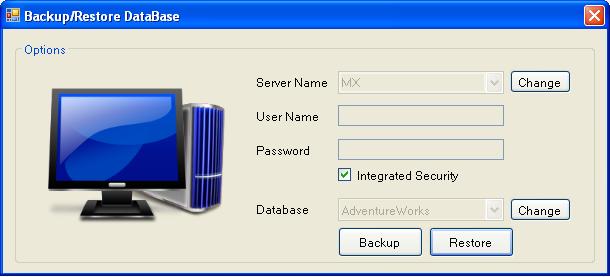
Namespace you need to add:
using Microsoft.SqlServer.Management.Smo; using Microsoft.SqlServer.Management.Common; using System.IO;
I am not going to write on and on and just make it going boring, so it’s better just download the code and check the comments, they are one liners, but clears everything.
Download Full Application Here: DBBackup.zip (290.99 kb)


paras patel
Sep 11, 2011 -
using Microsoft.SqlServer.Management.Smo;
using Microsoft.SqlServer.Management.Common;
using System.IO;
how can i insert this three line in my c# project and give this namespace for the sql server plz give me help
prashant
Sep 11, 2011 -
You need to manually add the reference in your project.
Right-Click [b]References[/b] in Solution Explorer and under .NET tab add the above 2 namespaces.
paras patel
Sep 11, 2011 -
thank you sir give me reply bet I cant get it namespace in my visual studio 2005 how can I insert and give specific name of .net name space
thankyou
prashant
Sep 11, 2011 -
Read here: http://stackoverflow.com/questions/4746151/microsoft-sqlserver-management-smo-namespace-what-do-i-need-to-install-to-resol
prashant
Sep 11, 2011 -
You need to add Microsoft.SqlServer.ConnectionInfo namespace from the .NET tab in the Add Reference dialog box.
paras patel
Sep 11, 2011 -
this name space is not my .net references so how can I possible this
prashant
Sep 11, 2011 -
Have you got SQL server installed on your machine?
If you still can’t find the namespace, then check the above link in the comments from stackoverflow and download the MSI (installer) for that.
paras patel
Sep 11, 2011 -
I get on file using Microsoft.SqlServer.Management.Common;
but second file I cant get it and not download so plz give me where I will find It
using Microsoft.SqlServer.Management.Smo; this file is not get
mohamed shareef.p
Nov 4, 2011 -
thank you………..!!!!!!!
Nguyễn Duy Nhân
Nov 10, 2011 -
I am doing an assignment on Backup + Restore database with Stored Procedures.
Backup is ok, but Restore the error: “RESTORE cannot process database ‘db_test’ because it is in use by this session. It is recommended that the master database be used when performing this operation.”.
I tried to fix but the document has not been, hope admin help with this problem. Thanks!
Link source: http://www.mediafire.com/?c1uldq2t7eczw3b
I use C # VS2010 + sql server 2005.
Prashant
Nov 10, 2011 -
You are using your own custom Stored Procedures to take the backup….and this is why you are using the same database you to backup and restore. Let’s say this: Open a file and then try deleting it. It won’t let you do that and prompt with the error message that the file is in use. Here you have to change the database to Master database and then use the in-built T-SQL function to restore or backup the database.
Read gere more about using these http://msdn.microsoft.com/en-us/library/ms186858.aspx
robin
Jan 2, 2012 -
It doesnot show the names of all the server instances in windows 7,can you help me
62071072
Jan 28, 2012 -
Hi I am doing backup of selected tables for selected database and selected server .
Now i need to backup stored procedures as well for few databases . Please help how can i do this ?
Prashant
Jan 28, 2012 -
If you taking the backup of the complete database then there is no need to backup the stored procedure separately. The above code/app will take the complete backup of the DB and not of the DB entities.
62071072
Jan 31, 2012 -
I am not doing the complete database backup . Let me say how my interface looks ..
Form contains servername where user needs to select the server when user selects server then list of dtabases will be populated for corresponding server and when user selects database then list of tables will be populated for corresponding database and user selects the tables need to backup and when he does backup the backup is done in textfile for selected tables with options tablestructure,data and table structure or only data .
Now i want to provide another option if user selects storedprocedure then it should display all the stroed procedures for corresponding database and when select backup it should do backup in a textfile of all the stored procedures.
Mihai Moisei
Feb 7, 2012 -
Hi,
On your project I’ve added the necesary refereneces but I have an error on this line :
Backup bkpDatabase = new Backup(); // the type or namespace Backup could not be found.
I’m trying to make a WPF application that makes backups.
Could you guide me with what I have to do to make a backup ?
thank you
Prashant
Feb 7, 2012 -
I doubt whether the assemblies I have used in the example will work with WPF. I will check and revert.
ajay dhole
Feb 8, 2012 -
if database is in use then it gives me an error restore failed for ‘server-name’.
arisha
Feb 17, 2012 -
i could not find backup, BackupDeviceItem and restore classes in your example can you plz help me
arisha
Feb 17, 2012 -
plz reply
arisha
Feb 18, 2012 -
im also facing same error while restoring database
Prashant
Feb 18, 2012 -
@ajay: if database is in use you cannot restore of the database (using C# code).
@arisha: I can’t recall what the code I used to place the database backup. I believe it is the same working directory where the application is running.
arisha
Feb 18, 2012 -
ohhh i got backup() and restore() classes by adding an assembly reference thanks for your guidance…….
still when i try to restore database it give error because when database is in use it don’t restore but when database is deattach it don’t come in available databases list then how we will restore it?
Prashant
Feb 19, 2012 -
I haven’t tried this…but I think that you cannot get the database backup until it is being used by some other process. If you detach it from the SQL Server then you will not be able to get the list of all the databases.
ethiraj
Mar 16, 2012 -
Hi ,
i need to take backup from attached sql server db in c# windows app,so any tell me how to done this one
Prashant
Mar 18, 2012 -
What do you mean by attached? When we are taking the backup of the database using C#, the database is already attached to the SQL Server.
Does the above application throws some error? Or you want to do something different? Let me know
sorterevolver
Mar 20, 2012 -
hi Prashant;
I have several question.Some of them can be easy but forgive me ı couldn’t find the questions in my country programmer blogers and I think I can find here.
I made a program.I used visual studio 2010 to make a program with sql server 2008.
1.Now I complete my program and I want to use it in another computer .Can I use my program which has sql database in a computer even don’t have sql server 2005. I think I need some program to setup at the opposite computer, but I am not sure.
2.In sql server 2008 I use management/Maintenance Plans to make a backup automatically for everyday. Now I checked it and it is working correctly. Bıt if I set this program to another computer may it work without sql server 2008?
That’s my first comment to a foreign website,if I made an apologies sorry for that.Thanks
Prashant
Mar 24, 2012 -
Hi sorterevolver,
1. The program will only work on the computers where you have SQL Server 2005/2008 installed. The dependencies used in the application comes up with SQL Server. Also if you have DB on different physical location but is attached to the SQL Server only then you will be able to take the DB backup. For an independent DB file, I doubt it will work.
2. We generally use SQL Agent jobs to take DB backup on timely basis. Again I suspect it will work without SQL Server.
For the second question I recommend you to ask this guy here: http://blog.sqlauthority.com/contact-me/
sorterevolver
Jan 18, 2013 -
Thank you prashant for your answer,have a nice day.
Hossein
Mar 31, 2012 -
Hi
Thanks for your code but i can’t use it.It throw an Error when the program want to run this part :::
//bkpDatabase.SqlBackup(srvr);
bkpDatabase.SqlBackup(srvr);
please Help me.
thanks
Prashant
Mar 31, 2012 -
Can you please share the error with me so I can know where the problem is?
marjan
Apr 3, 2012 -
hi
i have a database that has made in visualstudio2010 from adding new item to windowsform project.it has windows authentication.
now when i run your program it shows the server name in first combobox but it doesnt show anything in database combobox.and when i click update it shows error.how can i fix this problem?
thanks.
Prashant
Apr 6, 2012 -
If you have added a Db in the application then I doubt that the DB will get populated in the combobox. To get it populated you need to attach the same DB to SQL Server.
Bhaskar Siddapuram
Apr 21, 2012 -
// here is the code it works perfectly..hope same for you.
using Microsoft.SqlServer.Management;
using Microsoft.SqlServer.Management.Nmo;
using Microsoft.SqlServer.Management.Smo;
using Microsoft.SqlServer.Management.Smo.Agent;
using Microsoft.SqlServer.Management.Smo.Broker;
using Microsoft.SqlServer.Management.Smo.Mail;
using Microsoft.SqlServer.Management.Smo.RegisteredServers;
using Microsoft.SqlServer.Management.Smo.Wmi;
using Microsoft.SqlServer.Management.Trace;
using Microsoft.SqlServer.Management.Common;
//if you add 2 dlls smi and common from C:\Program Files\Microsoft SQL Server\90\SDK\Assemblies
// here you can find dll’s , add them to your solution bin folder.
Backup sqlBackup = new Backup();
sqlBackup.Action = BackupActionType.Database;
sqlBackup.BackupSetDescription = "ArchiveDataBase:" +
DateTime.Now.ToShortDateString();
sqlBackup.BackupSetName = "School_" + DateTime.Now.ToShortDateString();
sqlBackup.Database = databaseName;
BackupDeviceItem deviceItem = new BackupDeviceItem(destinationPath + "School_" + DateTime.Today.Day + "_" + DateTime.Today.Month + "_" + DateTime.Today.Year + "_" + DateTime.Now.Hour + "_" + DateTime.Now.Minute + "_" + DateTime.Now.Second + ".bak", DeviceType.File);
ServerConnection connection = new ServerConnection(serverName, userName, password);
Server sqlServer = new Server(connection);
Database db = sqlServer.Databases[databaseName];
sqlBackup.Initialize = true;
sqlBackup.Checksum = true;
sqlBackup.ContinueAfterError = true;
sqlBackup.Devices.Add(deviceItem);
sqlBackup.Incremental = false;
sqlBackup.ExpirationDate = DateTime.Now.AddDays(3);
sqlBackup.LogTruncation = BackupTruncateLogType.Truncate;
sqlBackup.FormatMedia = false;
sqlBackup.SqlBackup(sqlServer);
Prashant
Apr 21, 2012 -
Thanks for the share Bhaskar
Satish
May 30, 2012 -
Then Forget It
MT
Jun 10, 2012 -
hello
Please help me
how to backup from sql express in wpf with c#?
Thanks
Prashant
Jun 11, 2012 -
To take backup of the SQL Express DB, the process is the same as shown in the post.
if you are facing any problem then let me know.
Thanks
vinhhc
Jul 18, 2012 -
I run your project
But Form load Server name (combobox) nothing!
I have installed Sql Server 2005
it is SQL Server Management Studio Express 2005 for Windows XP 32 bit
I to default Windows Authentication
This solves the problem How do?
Thanks
Prashant
Jul 18, 2012 -
I built this on XP 32-bit and SQL 2005 only and was working fine. Did you get any exception? Use try catch block and debug the code and see if there is any problem.
vinhhc
Jul 20, 2012 -
I built it no error ,no warning!
I don't know how to solves it
The problem here is what?
Is it because I have installed the Sql Server 2005 in Visual Studio. NET 2008
Thanks!
egon
Aug 3, 2012 -
Hello Prashant.i'm run your project but form loading this error
Error 7 The type 'Microsoft.SqlServer.Management.Sdk.Sfc.IAlienObject' is defined in an assembly that is not referenced. You must add a reference to assembly 'Microsoft.SqlServer.Management.Sdk.Sfc, Version=10.0.0.0, Culture=neutral,
PublicKeyToken=89845dcd8080cc91'. G:\down0712\DBBackup\DBBackup\DBBackup\DBBackup.cs 17 31 DBBackup
i use SQL Server 2008 R2 and Visual Studio 2010.
Thanks.
Prashant
Aug 4, 2012 -
I don't know what exactly causing this error but it seems that it is because of the version of SQL you are using. I tried it when I was using SQL 2005.
nkanyiso
Sep 2, 2012 -
Go to project 1 reffence 2 browse 3 C: drive 4 Program file 5 microsoft sql sever 6 select 100 7 : SDK 8 assambleis
than you can get all namespace
Nkanyiso Shangase from DUT
mukesh
Mar 6, 2013 -
how to add the refference in Visual Studio. NET 2008
Prashant
Mar 6, 2013 -
I build this in VS 2008. If you can’t see the assembly then try a searching the OS drive (C: generally) and then add it to the references. I do agree as this assembly is pretty hard to find with older versions of VS. It’s a long time back so I don’t exactly recall how I added it.